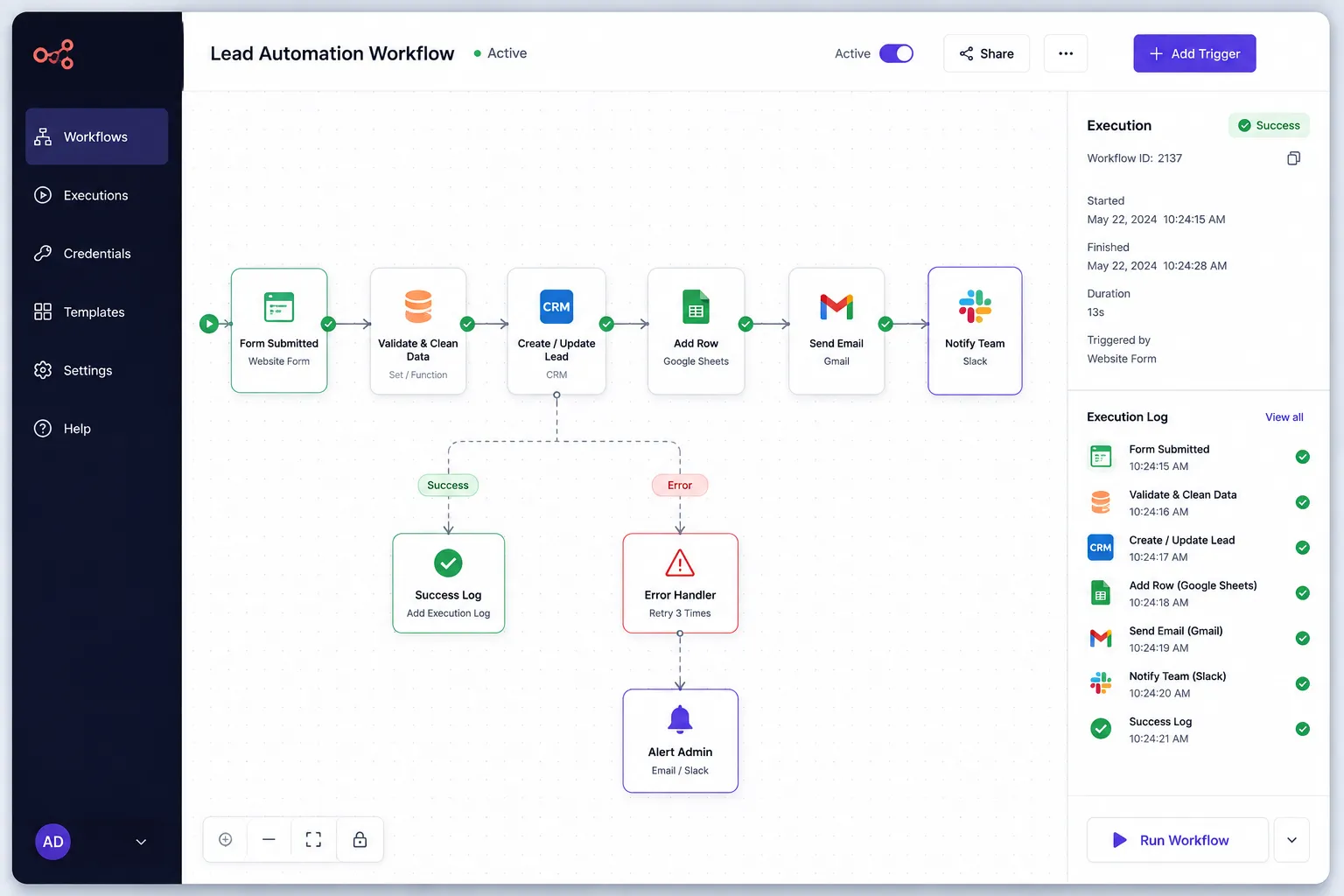
Business Workflow Automation
A custom automation system that connects business tools, eliminates repetitive tasks, and keeps operations running smoothly without manual data entry.
The problem
Employees spent hours copying information between forms, emails, spreadsheets, and business systems. The repetitive process slowed operations, increased the risk of mistakes, and made it difficult to keep information up to date.
Challenges
- Connecting multiple business applications
- Keeping data synchronized automatically
- Reducing manual errors
- Making automation easy to monitor
Strategy
Create one automated workflow that moves information between business tools, keeps teams informed, and allows staff to focus on higher-value work instead of repetitive administration.
Solution
I built a custom workflow automation system that automatically transfers information between forms, email, spreadsheets, and business software. The system keeps records synchronized, notifies team members when action is required, and monitors every workflow to ensure reliable day-to-day operations.
Project notes
Overview
Many businesses lose hours every week performing the same repetitive administrative tasks. Information is copied between forms, emails, spreadsheets, customer databases, and communication tools, creating unnecessary work and increasing the chance of mistakes.
This project automated those everyday processes.
I developed a custom workflow automation system that connects business applications and moves information automatically between them. Instead of manually updating multiple systems, employees can focus on customers and business operations while the automation handles repetitive tasks behind the scenes.
The Challenge
The business relied on several separate tools that didn’t communicate with one another.
Whenever a new customer inquiry arrived, employees had to manually copy information into spreadsheets, update customer records, send emails, and notify team members. As the business grew, these repetitive tasks became increasingly time-consuming and prone to human error.
My Solution
I designed and built a centralized automation system that connects the company’s existing business tools into one seamless workflow.
Information now flows automatically between applications, records stay synchronized, notifications are delivered at the right time, and the entire process is monitored to ensure every task completes successfully.
The automation works quietly in the background while giving the team complete visibility into every workflow.
Key Features
- Automatic data synchronization
- Workflow automation across multiple systems
- Team notifications
- Business rule automation
- Activity monitoring
- Error recovery
- Scalable integrations
- Reduced manual administration
Business Impact
The business now spends significantly less time on repetitive administrative work.
Employees no longer need to manually transfer information between systems, data stays consistent across the organization, and workflows complete more quickly with fewer mistakes. This allows the team to focus on higher-value work instead of routine data entry.
Technology
Built using a reliable automation stack designed for long-term scalability.
- n8n
- APIs
- Google Workspace
- Webhooks
The system can easily integrate with additional business applications as operational needs continue to grow.
What I Learned
Successful automation isn’t about replacing people—it’s about removing repetitive work that prevents them from focusing on more valuable tasks. Reliable monitoring and clear visibility are essential for building automation that businesses can trust.
Final Outcome
The company now operates with faster, more reliable workflows that reduce manual effort, improve data accuracy, and connect multiple business systems into one seamless process.
System architecture
Business Inputs
Automation
Business Systems
Key features
- ✓Automatic data synchronization
- ✓Lead and customer workflow automation
- ✓Team notifications
- ✓Error monitoring and recovery
- ✓Activity history
- ✓Scalable business workflows
Results
Manual Data Entry
Greatly Reduced
Operational Errors
Fewer
Workflow Speed
Much Faster
Team Productivity
Improved
Lessons learned
- The best automation is almost invisible to the people using it.
- Reliable monitoring is just as important as the automation itself.
- Small workflow improvements create significant long-term time savings.